@karmaniverous/serify-deserify
serify-deserify



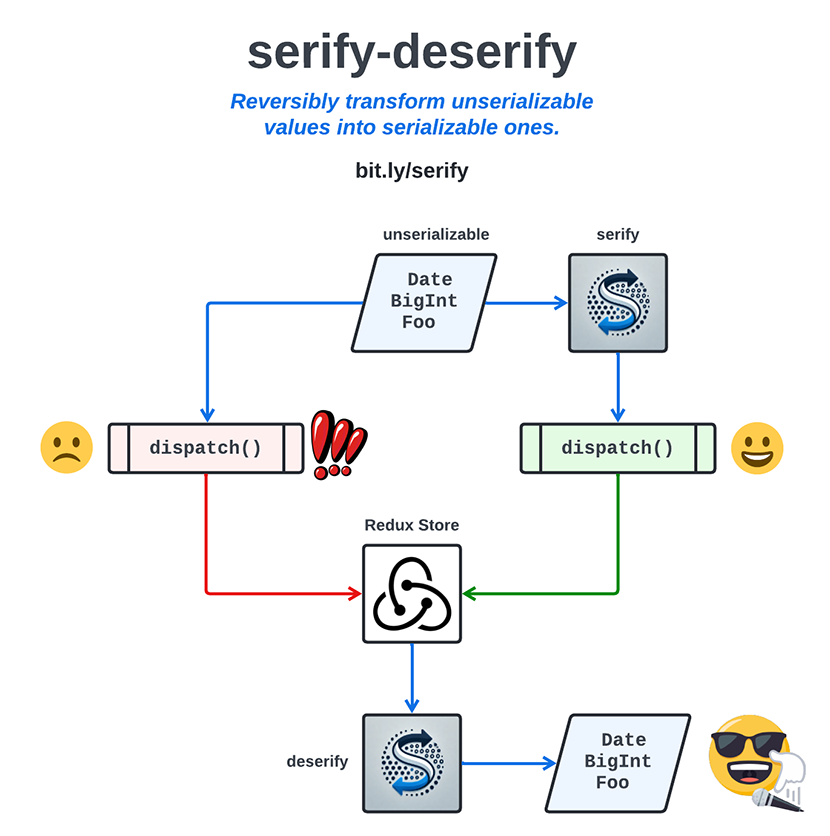
serify - reversibly transform an unserializable value into a serializable one
deserify - do the exact opposite
Why?
JSON.stringify and JSON.parse are a notoriously bad serializer/deserializer combination. They don't support important JavaScript types like BigInt, Date, Map, Set, and undefined. Thanks to backward compatibility risk, they probably never will.
There are tons of custom serializers that address this issue, notably serialize-javascript and serializr. Unfortunately, some key JavaScript tools like Redux explicitly depend on JSON.stringify & JSON.parse. So if you use Redux, none of those fancy serializers will help you get a Date or a BigInt into your store and back out again in one piece.
serify solves this problem by encoding those values (or structures containing them) into values that JSON.stringify can serialize without throwing an exception. After these values are retrieved and deserialized with JSON.parse, deserify returns them to their original state.
Usage
To install the package, run this command:
npm install @karmaniverous/serify-deserify
This package is ESM-only. CommonJS consumers on Node.js 20.19+ or 22.12+ can still load it with require().
A simple example:
import {
serify,
deserify,
defaultOptions,
} from '@karmaniverous/serify-deserify';
// A BigInt test value.
const value = 42n;
const serified = serify(value, defaultOptions);
// { serifyKey: null, type: 'BigInt', value: '42' }
const deserified = deserify(serified, defaultOptions);
// 42n
Every example in this README is exercised by readme.test.ts. Review the unit tests for more examples of how to use serify, deserify, and createReduxMiddleware.
Serifiable Types
serify and deserify will work on values of any serifiable type.
A serifiable type is any type that is:
- supported by
JSON.stringifyandJSON.parse, i.e.null, booleans, numbers, strings, plain objects, and arrays. - natively supported by
serify, i.e.BigInt,Date,Map,Set,undefined, null-prototype objects (Object.create(null)), and the numbers JSON can't represent (NaN,Infinity,-Infinity&-0). - added to
serifyas a custom type. - composed exclusively of any of the above (e.g. an array of BigInt-keyed Maps of objects containing Sets of custom class instances).
Numbers that JSON.stringify can't round-trip (NaN, Infinity & -Infinity become null; -0 becomes 0) are serified as the Number type. Every other number passes through untouched. If your options don't include a Number type, serify throws on these values.
Only own, enumerable, string-keyed properties of objects are serified. As with JSON.stringify, symbol-keyed and non-enumerable properties are dropped.
Anything else (e.g. a symbol, a function, or an instance of a class that is not configured in your options) causes serify to throw.
serifyKey
serify works by converting unserializable values into structured objects that ARE serializable. Each one has the form { serifyKey, type, value }.
deserify treats any plain object as a serified value if its serifyKey matches your options and its type is one of your configured types. Consider the highly unlikely event that some data you want to deserify contains an object like this that was not produced by serify:
const data = { serifyKey: null, type: 'Date', value: 'Bar' };
deserify(data, defaultOptions);
// Invalid Date
In this case, simply add a non-null serifyKey of a serializable primitive type (meaning a boolean, number, or string) to your options object, and everything will work again:
const keyedOptions = { ...defaultOptions, serifyKey: 'my-serify-key' };
deserify(data, keyedOptions);
// { serifyKey: null, type: 'Date', value: 'Bar' }
Objects whose type is not configured in your options are never deserified, whatever their serifyKey.
Options
Serifiable types and the serifyKey are defined in an options object, which specifies the logic that converts each type to and from a serializable form.
Default Configuration
Out of the box, the defaultOptions object has a null serifyKey and supports these types:
| Type key | Value | Serified value |
|---|---|---|
BigInt |
bigint |
decimal string |
Date |
Date |
epoch milliseconds (number) |
Map |
Map |
array of [key, value] entries |
Set |
Set |
array of values |
Undefined |
undefined |
null |
NullObject |
null-prototype object |
plain object |
Number |
NaN, ±Infinity, -0 |
string, e.g. '-Infinity' |
If you only need the default configuration, simply import the defaultOptions object and pass it to serify and deserify, as in the Usage example above.
Custom Configuration
If you need to change the serifyKey or add custom types, you can create a new options object and pass it to serify and deserify.
serify finds the key of a value's type in your options like this:
- A null-prototype object's key is
NullObject. - Any other object whose prototype chain has a constructor (e.g. a class instance) is keyed by the value of its class's Static Type Property if it has one, otherwise by its class name. The constructor is read from the prototype, so a property named
constructorcan't spoof it. - Anything else gets the type name reported by
is-what'sgetType(e.g.BigInt,Number,Undefined,Symbol,Function).
import {
serify,
deserify,
defaultOptions,
} from '@karmaniverous/serify-deserify';
// A custom class.
export class Custom {
constructor(p) {
this.p = p;
}
}
// A serify options object including support for the new custom type.
const customOptions = {
...defaultOptions,
serifyKey: 42,
types: {
...defaultOptions.types,
Custom: {
serifier: (value) => value.p,
deserifier: (value) => new Custom(value),
},
},
};
// A Custom test value.
const customAnswer = new Custom(42);
const serified = serify(customAnswer, customOptions);
// { serifyKey: 42, type: 'Custom', value: 42 }
const deserified = deserify(serified, customOptions);
// Custom { p: 42 }
Static Type Property
Normally, a type's key in the serify options object is the type's class name. If a class is dynamically generated (or its name is mangled by a minifier), this value may not be known at compile time, so it would not be possible to configure it into the options object in a static manner.
One option is to alter the options object at runtime. Go nuts!
Another is to import the serifyStaticTypeProperty symbol to create a static property on your class. Use its value as the type key in your options object.
import {
serify,
deserify,
defaultOptions,
serifyStaticTypeProperty,
} from '@karmaniverous/serify-deserify';
// A custom class.
export class CustomFoo {
static [serifyStaticTypeProperty] = 'Foo';
constructor(p) {
this.p = p;
}
}
// A serify options object including support for the new custom type.
const customOptions = {
...defaultOptions,
serifyKey: 42,
types: {
...defaultOptions.types,
Foo: {
serifier: (value) => value.p,
deserifier: (value) => new CustomFoo(value),
},
},
};
// A CustomFoo test value.
const customAnswer = new CustomFoo(42);
const serified = serify(customAnswer, customOptions);
// { serifyKey: 42, type: 'Foo', value: 42 }
const deserified = deserify(serified, customOptions);
// CustomFoo { p: 42 }
TypeScript
serify-deserify is fully type-safe. If you are using TypeScript, you can define your custom types and options objects with full type checking.
This is accomplished by defining a special type map interface that maps each type's key to a [UnserifiedType, SerifiedType] tuple. The serifier & deserifier callbacks for each type are then type-checked against that tuple. See defaultOptions.ts to review the default configuration as an example.
Here's the last example again, but with TypeScript:
import {
serify,
deserify,
defaultOptions,
serifyStaticTypeProperty,
type DefaultTypeMap,
type SerifyOptions,
} from '@karmaniverous/serify-deserify';
// A custom class.
export class CustomFoo {
static [serifyStaticTypeProperty] = 'Foo';
constructor(public p: number) {}
}
// Extend the default type map to include your new type.
// The tuple indicates the type before and after serification.
interface CustomFooTypeMap extends DefaultTypeMap {
Foo: [CustomFoo, number];
}
// A serify options object including support for the new custom type.
const customOptions: SerifyOptions<CustomFooTypeMap> = {
...defaultOptions,
serifyKey: 42,
types: {
...defaultOptions.types,
Foo: {
serifier: (value) => value.p,
deserifier: (value) => new CustomFoo(value),
},
},
};
// A CustomFoo test value.
const customAnswer = new CustomFoo(42);
const serified = serify(customAnswer, customOptions);
// { serifyKey: 42, type: 'Foo', value: 42 }
const deserified = deserify(serified, customOptions);
// CustomFoo { p: 42 }
If your options don't build on defaultOptions, extend SerifiableTypeMap instead of DefaultTypeMap.
serify & deserify return unknown: assert or narrow the result to the type you expect.
Recursion
In the Custom Configuration example above, the Custom class contains a single property p that is populated with a primitive, serializable value (a number). So once a Custom value is serified with the serifier function defined above, there will be no difficulty serializing the value property of the resulting object.
What if the Custom class contained a property that was itself not serializable? This is the case with the Map class, which can contain keys and values of any type, including unserializable ones.
If you look at the defaultOptions object, you'll see that the Map type's serifier and deserifier functions are quite simple:
export interface DefaultTypeMap extends SerifiableTypeMap {
...;
Map: [Map<unknown, unknown>, [unknown, unknown][]];
...;
}
export const defaultOptions: SerifyOptions<DefaultTypeMap> = {
...,
types: {
...,
Map: {
serifier: (value) => [...value.entries()],
deserifier: (value) => new Map(value),
},
...,
},
};
This works because serify & deserify are applied recursively: serify serifies whatever your serifier returns, and deserify deserifies a serified value's contents before handing them to your deserifier. So your callbacks only need to support the direct transformation of a type into a serializable form and back again, without regard to the resulting contents... so long as those contents are also composed of serifiable types.
Redux
The createReduxMiddleware function generates a Redux middleware that will serify the payload of every action dispatched to your Redux store, so that only serializable values reach your reducers.
@reduxjs/toolkit (v2) is an optional peer dependency: its Middleware type appears in this package's type declarations, but nothing from it is imported at runtime. Install it if you use createReduxMiddleware; otherwise you can ignore it.
If you dispatch a value of a type that is not configured in your options, dispatch will throw an unserifiable type error naming the missing type. Leave Redux Toolkit's default serializableCheck middleware in place as a backstop for anything that slips into your store some other way.
When retrieving values from the Redux store, either deserify them explicitly or wrap your selectors in the deserify function.
See the createReduxMiddleware unit tests for a fully worked out example with custom types, or just try this for the out-of-the-box experience (H/T @tuffstuff9):
import {
combineReducers,
configureStore,
createSlice,
type PayloadAction,
} from '@reduxjs/toolkit';
import {
createReduxMiddleware,
defaultOptions,
deserify,
} from '@karmaniverous/serify-deserify';
// Create middleware.
const serifyMiddleware = createReduxMiddleware(defaultOptions);
// Construct slice.
const testSlice = createSlice({
name: 'test',
initialState: { value: null as unknown },
reducers: {
setValue: (state, { payload }: PayloadAction<unknown>) => {
state.value = payload;
},
},
});
// Configure redux store.
const store = configureStore({
reducer: combineReducers({
test: testSlice.reducer,
}),
middleware: (getDefaultMiddleware) =>
getDefaultMiddleware().concat(serifyMiddleware),
});
// Dispatch an unserializable value...
store.dispatch(testSlice.actions.setValue(42n));
// ...and get it back out again.
const value = deserify(store.getState().test.value, defaultOptions);
// 42n
Note that the middleware replaces the payload of the dispatched action object in place, then passes the action on and returns the result, so dispatch return values are preserved.
Immutability
Neither serify nor deserify mutates its input. Each clones the value while recursively processing its contents, and always returns new arrays & plain objects.
deserify implicitly assumes that its input is composed entirely of serializable types (otherwise why bother attempting to deserify it?).
Errors
serifythrowsError('unserifiable type: <key>')when it meets a value whose type key is not configured in your options and that is not a serializable primitive, array, or plain object.deserifythrowsError('Value is not deserifiable: <JSON>')when it meets a value that is not a serializable primitive, array, or plain object.
See more great templates and other tools on my GitHub Profile!