OpenClaw Integration Guide
The @karmaniverous/jeeves-watcher-openclaw plugin gives your OpenClaw agent access to jeeves-watcher's semantic search, metadata enrichment, and management capabilities.
Installation
Standard (OpenClaw CLI)
openclaw plugins install @karmaniverous/jeeves-watcher-openclaw
Self-Installer
OpenClaw's plugins install command has a known bug on Windows where it fails with spawn EINVAL or spawn npm ENOENT (#9224, #4557, #6086). This package includes a self-installer that works around the issue:
npx @karmaniverous/jeeves-watcher-openclaw install
The installer:
- Copies the plugin into OpenClaw's extensions directory (
~/.openclaw/extensions/jeeves-watcher-openclaw/) - Adds the plugin to
plugins.entriesinopenclaw.json - If
plugins.allowortools.alloware already populated (explicit allowlists), adds the plugin to those lists
To remove:
npx @karmaniverous/jeeves-watcher-openclaw uninstall
Non-default installations
If OpenClaw is installed at a non-default location, set one of these environment variables:
| Variable | Description |
|---|---|
OPENCLAW_CONFIG |
Full path to openclaw.json (overrides all other detection) |
OPENCLAW_HOME |
Path to the .openclaw directory |
Default location: ~/.openclaw/openclaw.json
After install or uninstall, restart the OpenClaw gateway to apply changes.
Configuration
The plugin needs the URL of a running jeeves-watcher REST API. Set the plugin config in openclaw.json under plugins.entries.jeeves-watcher-openclaw.config:
{
"apiUrl": "http://127.0.0.1:1936",
"configRoot": "j:/config"
}
apiUrl— jeeves-watcher API base URL (default:http://127.0.0.1:1936)configRoot— platform config root path, used by@karmaniverous/jeevescore to derive{configRoot}/jeeves-watcher/for component config (default:j:/config)
Available Tools
watcher_status
Returns service health, uptime, and Qdrant collection statistics. No parameters required.
watcher_search
Semantic search across all indexed documents. Pass a natural-language query and optional filters.
Parameters:
query(string, required) — search textlimit(number) — max results (default: 10)offset(number) — skip N results for paginationfilter(object) — Qdrant filter conditions
watcher_enrich
Set or update metadata on a document by file path.
watcher_config
Query the effective runtime config via JSONPath. Returns the full resolved merged document when no path is provided. Useful for discovering available inference rules, schemas, and runtime values.
Parameters:
path(string, optional) — JSONPath expression
watcher_validate
Validate a jeeves-watcher configuration object. Returns validation errors if any.
watcher_config_apply
Apply a new configuration to the running watcher service. Triggers re-evaluation of watched paths and rules.
watcher_reindex
Trigger a scoped reindex of watched files. Supports rules (default), full, issues, path, and prune scopes. Returns a blast area plan.
Parameters:
scope(string) — reindex scope (default:rules)path(string | string[]) — target path(s) forpathscopedryRun(boolean) — compute plan without executing
watcher_walk
Walk watched filesystem paths with glob intersection. Returns matching file paths from all configured watch roots.
Parameters:
globs(string[], required) — glob patterns to intersect with watch paths
watcher_scan
Filter-only point query without vector search. Returns metadata for points matching a Qdrant filter. Use for structural queries: file enumeration, staleness checks, domain listing, counts.
Parameters:
filter(object, required) — Qdrant filter objectlimit(number) — page size (default: 100, max: 1000)cursor(string) — opaque cursor from previous response for paginationfields(string[]) — payload fields to return (projection)countOnly(boolean) — if true, return{ count }instead of points
watcher_issues
List current indexing issues — files that failed extraction, embedding errors, etc.
watcher_service
Manage the watcher background service (install, uninstall, start, stop, restart, status).
Parameters:
action(string, required) — one of:install,uninstall,start,stop,restart,status
Architecture
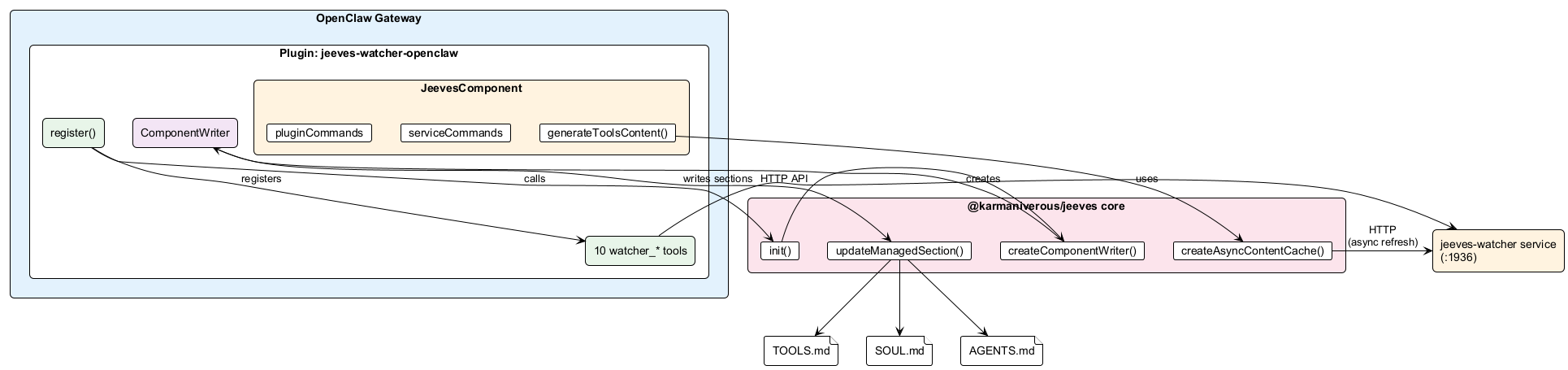
Jeeves Platform Integration
The plugin integrates with @karmaniverous/jeeves core to manage workspace content via ComponentWriter:
Managed content
On startup, the plugin initializes core (init({ workspacePath, configRoot })) and starts a ComponentWriter that:
- Writes a
## Watchersection to TOOLS.md — live menu of indexed content, score thresholds, inference rules, and escalation guidance - Refreshes every 71 seconds (prime interval) — only writes to disk if content changed
- Maintains shared platform content — SOUL.md, AGENTS.md, and a
## Platformsection in TOOLS.md are all managed by core
Content is enclosed in HTML comment markers (<!-- BEGIN JEEVES PLATFORM TOOLS ... --> / <!-- END ... -->). User content outside the markers is never touched.
Service & plugin commands
The plugin exposes lifecycle commands via the JeevesComponent interface:
| Command | Action |
|---|---|
serviceCommands.stop() |
jeeves-watcher service stop |
serviceCommands.uninstall() |
jeeves-watcher service uninstall |
serviceCommands.status() |
HTTP probe to watcher API |
pluginCommands.uninstall() |
npx @karmaniverous/jeeves-watcher-openclaw uninstall |
Uninstall cleanup
The CLI uninstall command uses core's parseManaged() to locate and remove the Watcher section from TOOLS.md. If no other sections remain, the entire managed block is removed.
Example Usage Patterns
Search for relevant documents
"Search the watcher for documents about authentication configuration"
The agent calls watcher_search with the query and returns matching document chunks with their source paths and metadata.
Check service health
"Is the watcher service running? How many documents are indexed?"
The agent calls watcher_status and reports uptime, health, and collection point count.
Investigate indexing problems
"Are there any files that failed to index?"
The agent calls watcher_issues and summarizes any errors or warnings.
Reindex after config change
"I updated the watcher config — please reindex everything"
The agent calls watcher_config_apply (if a new config is provided) followed by watcher_reindex.