Event Gateway
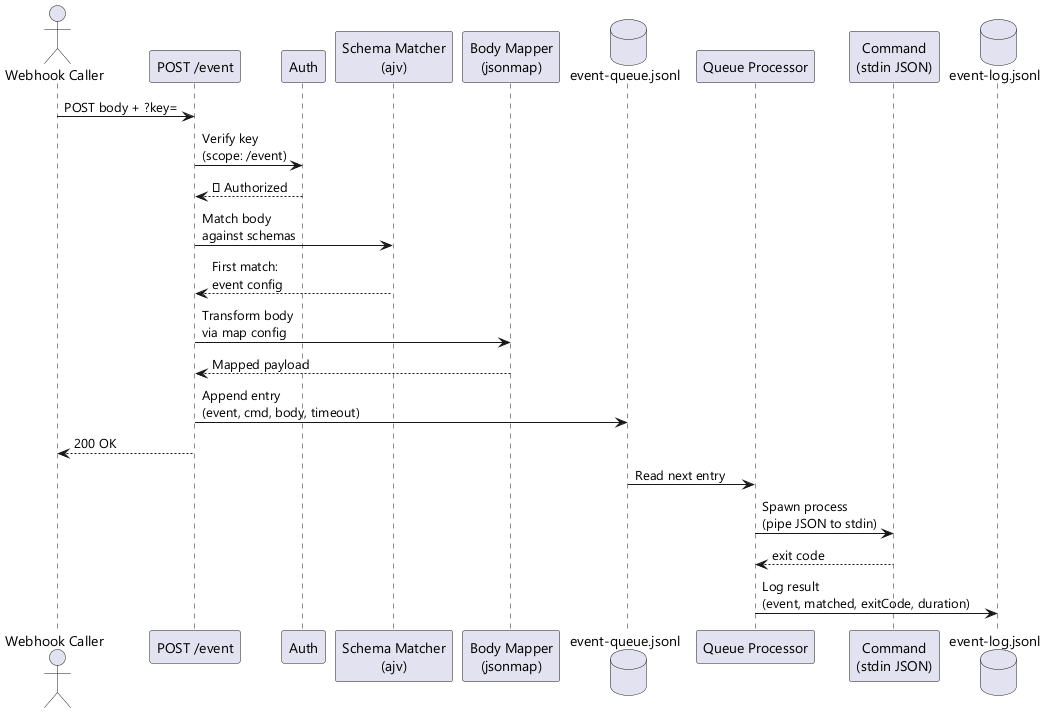
Jeeves Server includes a webhook gateway that receives HTTP POST requests, validates them against JSON Schema rules, and dispatches matched events to shell commands via a durable queue.
Overview
Configuration
Events are defined in your config file:
{
"events": {
"notion-page-update": {
"schema": {
"type": "object",
"properties": {
"type": { "const": "page.content_updated" }
},
"required": ["type"]
},
"cmd": "node /path/to/handler.js",
"map": {
"pageId": {
"$": { "method": "$.lib._.get", "params": ["$.input", "data.page_id"] }
},
"type": {
"$": { "method": "$.lib._.get", "params": ["$.input", "type"] }
}
},
"timeoutMs": 60000
}
}
}
Schema matching
Each event has a JSON Schema that's validated against the incoming request body using ajv. The first matching event wins — order matters if schemas could overlap.
Common patterns:
// Match a specific event type
{ "type": "object", "properties": { "type": { "const": "page.content_updated" } }, "required": ["type"] }
// Match any object with an "action" field
{ "type": "object", "required": ["action"] }
// Match based on nested field
{ "type": "object", "properties": { "data": { "type": "object", "properties": { "status": { "const": "completed" } } } } }
Body mapping with JsonMap
When an event config includes a map object, the incoming body is transformed via @karmaniverous/jsonmap before being passed to the command. This extracts only the fields you need from potentially large webhook payloads.
The lib object available in mappings includes radash as _.
When map is omitted, the full webhook body is passed as-is.
Example — Notion sends a large payload, we extract just two fields:
{
"pageId": {
"$": { "method": "$.lib._.get", "params": ["$.input", "data.page_id"] }
},
"type": {
"$": { "method": "$.lib._.get", "params": ["$.input", "type"] }
}
}
Input: { type: "page.content_updated", data: { page_id: "abc123", ... } }
Output to command: { pageId: "abc123", type: "page.content_updated" }
Authentication
Webhook callers must authenticate with a key that has scope access to /event:
{
"keys": {
"webhook-notion": {
"key": "random-seed-string",
"scopes": ["/event"]
}
}
}
Your config contains a seed — a secret string that never leaves the server. The actual URL key is derived from the seed by the server. To get it:
curl -s "https://your-domain.com/insider-key" -H "X-API-Key: <your-seed>"
# Returns: { "key": "a1b2c3d4..." }
Use the returned key in webhook URLs:
curl -X POST "https://your-domain.com/event?key=<derived-key>" \
-H "Content-Type: application/json" \
-d '{"type": "page.content_updated", "data": {"page_id": "abc123"}}'
Insiders with /event scope can also copy an authenticated event URL directly from the Event link button in the header bar — no command line needed.
See the Insiders, Outsiders & Sharing guide for full details on the key model.
Queue Processing
Events are processed through a durable JSONL queue:
- Append — Validated events are appended to
logs/event-queue.jsonlwith metadata - Drain — A single-threaded processor reads entries sequentially
- Execute — For each entry, the
cmdis spawned with the (optionally mapped) body piped as JSON to stdin - Timeout — Commands are killed after
timeoutMs(per-event or the globaleventTimeoutMsdefault) - Errors logged — The command is responsible for its own error handling; the queue processor logs and moves on
- Cursor — A cursor file (
logs/event-queue.cursor) tracks the byte offset of the last processed entry, surviving restarts
Queue entry format
{"ts":"2026-02-15T05:00:00Z","event":"notion-page-update","cmd":"node handler.js","body":{"pageId":"abc123"},"timeoutMs":60000}
Durability
The queue survives server restarts. On startup, the processor reads the cursor file and resumes from where it left off. If the cursor file is missing, processing starts from the beginning of the queue.
Event Logging
All events — matched and unmatched — are logged to logs/event-log.jsonl:
{"ts":"2026-02-15T05:00:00Z","event":"notion-page-update","matched":true,"exitCode":0,"durationMs":1234}
{"ts":"2026-02-15T05:00:01Z","event":null,"matched":false,"bodyPreview":"..."}
Log purging
Each log write also purges entries older than eventLogPurgeMs (default: 30 days). This keeps the log file from growing unbounded.
Writing Event Handlers
Your command receives the (optionally mapped) body as JSON on stdin:
// handler.js
const chunks = [];
process.stdin.on('data', (chunk) => chunks.push(chunk));
process.stdin.on('end', () => {
const body = JSON.parse(Buffer.concat(chunks).toString());
console.log('Received:', body.pageId);
// Do your work here
});
Key points:
- The command runs in the server's working directory
- stdout/stderr are captured for logging
- Exit code 0 = success, anything else = failure (logged but not retried)
- The command must complete within
timeoutMsor it's killed
Global Settings
{
"eventTimeoutMs": 30000,
"eventLogPurgeMs": 2592000000
}
Monitoring
Via API
# Get 20 most recent event log entries (no auth required)
curl http://localhost:1934/api/status?events=20
The eventLog array in the response contains entries newest-first, each with ts, event, matched, exitCode, and durationMs.
Via log files
Check the event log for failures:
# Recent failures
grep '"exitCode":' logs/event-log.jsonl | grep -v '"exitCode":0'
# Unmatched events (potential misconfiguration)
grep '"matched":false' logs/event-log.jsonl
Example: Notion Webhook Integration
- Configure the event in
your config file(see Configuration above) - Create a scoped key for the webhook
- Register the webhook URL in Notion:
- Settings → Connections → Add a connection
- Webhook URL:
https://your-domain.com/event?key=<webhook-derived-key>
- Write your handler to process the mapped body
- Verify by triggering a page update and checking
logs/event-log.jsonl
Note: Notion signs webhooks with HMAC. For production use, add signature verification in your handler before processing.