Insiders, Outsiders & Sharing
Jeeves Server has a clear access model built around two roles: insiders and outsiders. Understanding the difference is key to using sharing effectively.
Insiders
An insider is an authenticated user on the server. Depending on their configuration, they may have full access or be scoped to specific paths. Within their scope, they can navigate directories, view files, and generate share links for others.
Who is an insider?
Anyone listed in the insiders map in your config:
{
"alice@example.com": {},
"bob@example.com": { "scopes": ["/d/projects/**"] }
}
How insiders authenticate
Depends on which auth modes are active:
- Google OAuth (
'google'mode) — Insider logs in with Google. The server checks their email against theinsidersmap. On first login, a key seed is auto-generated and persisted toconfig.json. - Email magic link (
'email'mode) — Insider enters their email on the sign-in page and is redirected to a verification page. If the email matches an insider, the server sends an email containing a one-time code and a clickable magic link. The user enters the code on the verification page (which decrypts a stateless token client-side) or clicks the magic link directly. Either path sets a session cookie identical to Google OAuth. On first login, a key seed is auto-generated. - Key auth (
'keys'mode) — Insider uses a derived URL key (?k=<insider-key>). The key is derived from a configured seed via HMAC-SHA256.
What insiders can do
- Browse all drives and directories (within their scopes)
- View rendered Markdown, code, SVG, Mermaid diagrams, and images
- Switch between Rendered and Raw views
- Export files as PDF, DOCX, ZIP, or tar
- Copy insider links (for other insiders)
- Generate outsider links (for external sharing)
- Rotate their key (invalidating all their outsider links)
Scoped insiders
Scopes restrict which paths an insider can access. Three formats are supported:
Allow-only (string array — backward compatible):
{
"contractor@example.com": {
"scopes": ["/d/projects/client-x/**"]
}
}
Allow with deny (broad access with cutouts):
{
"team-member@example.com": {
"scopes": {
"allow": ["/d/**"],
"deny": ["/d/secrets/**", "/d/.private/**"]
}
}
}
Deny-only (everything except exclusions):
{
"almost-full@example.com": {
"scopes": {
"deny": ["/d/hr/**", "/d/finance/**"]
}
}
}
Semantics:
- A path must match at least one allow rule and not match any deny rule
- Omitting
allow= implicit['/**'](allow everything) - Omitting
deny= no exclusions - Patterns are picomatch globs:
*matches within one path segment,**across segments. Use/d/projects/client-x/**to grant a whole tree; wildcard segments such as/d/projects/client-*/**are supported - Omitting scopes entirely = full access (unchanged)
How scopes are enforced
Scopes apply to every authenticated identity: Google-session insiders, insider keys, scoped machine keys, and share links minted by a scoped insider (which carry the issuer's scopes).
- Navigation — directory listings (
/api/path/...) and link info (/api/link-info/...) for a directory are allowed when the directory is in scope or is an ancestor of an allowed path, so a scoped insider can browse down to their scope from the root. Listings only show entries the insider can reach. - Content — viewing, raw download, export, export-cache, diagram export, file writes (
PUT/POST /api/file/...) and file metadata require the path itself to be in scope. Out-of-scope requests return 403 (Path is outside your access scope). - Drives —
/api/driveslists only roots the insider can navigate into. - Directory archives — ZIP/tar export omits out-of-scope entries, and the
maxZipSizeMblimit counts only in-scope content. - Share links —
POST /api/sharerefuses targets outside the sharer's scopes (403). - Session vs key — a session insider requesting an out-of-scope path still gets access if the URL carries a valid share key for it (the key's access then applies); otherwise 403.
Outsiders
An outsider is someone viewing a specific file or directory via a share link. They can see exactly what was shared — nothing more.
What outsiders can do
- View the shared file (rendered Markdown, code, images, etc.)
- Download the file (raw, PDF, or DOCX)
- Navigate within a shared directory (if a directory link was shared)
What outsiders cannot do
- Browse to other files or directories
- See the drive listing or parent directories
- Generate their own share links
- Rotate keys
How Sharing Works
The key model
Every insider has a seed — a secret string (either configured manually or auto-generated on Google login). From this seed, the server derives two types of keys:
| Key type | Derivation | Grants |
|---|---|---|
| Insider key | HMAC-SHA256(seed, "insider") |
Full browsing access (within scopes) |
| Outsider key | HMAC-SHA256(seed, normalized_path) |
Access to one specific path |
| Expiring outsider key | HMAC-SHA256(seed, path + "|" + expiry) |
Access to one path, until expiry |
All keys are truncated to 32 hex characters. Verification uses timing-safe comparison.
Generating a share link
In the header of any file or directory view, insiders see sharing controls:
- Link dropdown (🔗) — Copy a share link
- Expiry selector — Choose how long the link is valid: never, 1 hour, 1 day, 1 week, 1 month, or 1 year
The generated URL includes the outsider key as a ?k= parameter and (if expiring) an &exp= parameter with the expiration timestamp.
Example insider link:
https://jeeves.example.com/browse/d/docs/design.md?k=a1b2c3d4...
Example outsider link (expiring):
https://jeeves.example.com/browse/d/docs/design.md?k=e5f6a7b8...&exp=1771340000000
Directory sharing
When you share a directory link, the outsider can:
- See the directory listing
- Navigate into subdirectories
- View any file within that directory tree
The server checks the outsider key against the requested path and all ancestor paths, so a key generated for /d/docs/ also grants access to /d/docs/report.md and /d/docs/specs/api.md.
This applies to every directory share made without a depth or dirs: links from the UI, POST /api/share, and POST /api/util/share-for (the plugin's server_share with an insider audience). A directory shared with a depth or dirs is a deep share instead (see below).
The UI only makes plain directory shares: for a directory, the link menu hides the depth and dirs controls. Make a deep directory share through POST /api/share (with depth or dirs) or the plugin's server_share.
Deep shares (depth and dirs)
A share with a depth lets the outsider follow links from the shared document, up to that many hops. Each link the server renders for the outsider carries its own key, bound to that one target (k, plus d, dirs, s and any exp). A deep share key opens exactly the path it was issued for and nothing else.
- A link to another document is one hop.
- A link to a directory is followed only if the share allows directories (
dirs). Directories are recognised on the server, whether or not the link ends in/. - A directory reached this way shows only its immediate entries. Opening an entry is another hop: each entry in the listing carries its own link, and once the depth is used up entries are shown as plain text.
- Subdirectories in such a listing are directory hops too, so they need
dirsas well. - The sharer's own scopes are checked against every path the outsider opens.
Raw links for shared files
A share key works on every content route for its path, so swapping /browse/ for /api/raw/ in a file's share URL, keeping the whole query string, gives a working raw link. This holds for deep file shares too: the deep key still opens only that one file. POST /api/share reports isDirectory in its response, and the plugin's server_share returns rawUrl for file shares (plain or deep) and no rawUrl for directory shares.
Link expiration
- "Never" links work until the insider rotates their key
- Timed links expire at the specified time — after that, the key is cryptographically invalid
- Expiry is embedded in the key derivation itself, not stored server-side — there's nothing to clean up
Key rotation
The 🔑 button in the header rotates the insider's key seed. This:
- Invalidates all outsider links that insider has ever generated
- Generates a new insider key for the insider
- Is irreversible — old links cannot be restored
Use rotation when you need to revoke all shared links at once (e.g., a contractor's access ended, a link was shared too broadly).
Machine Keys
In addition to insider-generated keys, the server supports named machine keys for programmatic access:
{
"keys": {
"primary": "random-seed-string",
"webhook-notion": { "key": "another-seed", "scopes": ["/event"] },
"_internal": "internal-seed"
}
}
Machine keys follow the same derivation model:
- The insider key derived from an unscoped machine seed grants full access
- Machine seeds can also generate outsider keys for specific paths
- Scoped machine keys (like
webhook-notionabove) can only access matching paths
The _internal key
Reserved for server-side operations. Puppeteer uses this key when rendering PDFs and DOCX files (it loads the page in headless Chrome and needs to authenticate). It must be unscoped — the schema enforces this.
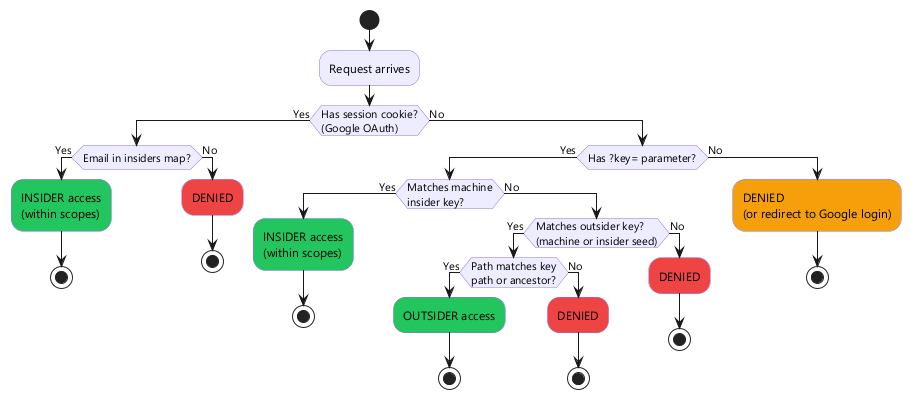
Access Decision Flow
When a request arrives, the server determines access as follows:
Insider vs outsider UI
The server renders different UI based on access mode:
| Feature | Insider | Outsider |
|---|---|---|
| Drive/directory browsing | ✅ | Only shared path |
| File viewing | ✅ | ✅ |
| PDF/DOCX export | ✅ | ✅ |
| Share link generation | ✅ | ❌ |
| Key rotation | ✅ | ❌ |
| Download dropdown | Full options | File download only |
Security Notes
- All keys are derived — seeds are never exposed in URLs. Even if someone captures an outsider key, they can't derive the insider key or access other paths.
- Timing-safe comparison — key verification uses constant-time comparison to prevent timing attacks.
- No server-side link storage — outsider keys are computed on-the-fly from the seed + path (+ optional expiry). There's no database of active links to breach.
- Path traversal is rejected — content paths containing a
..segment (either/or `` separated) are refused with 400 before any key or scope check. - Scopes are enforced at verification time — even if a valid key is presented, it's rejected if the path doesn't match the key's scopes.
- HTTPS recommended — keys are in URL parameters. Use HTTPS in production to prevent interception.